Friday, 20 November 2009

Installing AppFabric Caching Beta 1, Part 1

So Velocity now has a 'proper' name - AppFabric Caching, and it's finally in beta.

AppFabric Beta 1 can be downloaded from http://www.microsoft.com/downloads/details.aspx?FamilyID=0BD0B14F-D112-4F11-94BF-90B489622EDD&displaylang=en but it has a big list of dependencies and Microsoft didn't link to the download page for each dependency :-(

So, things you will need to install before installing AppFabric Beta 1 on Windows Server 2008:
IIS Web Deployment Tool (http://go.microsoft.com/?linkid=9684516)

Go get it all and install it - it's OK, I'll wait...

Got all that? Good, let's continue...

Fire up the AppFabric installer. Once you get past the licensing, you get to this screen:


This is where you select what to install. By default the Worker and Distributed Cache Service components are selected. The Worker component is for the Workflow and Windows Communications Frameworks parts of AppFabric. Assuming you're just interested in the caching side, unselect Worker and select the others.


Then we're into the caching configuration screen. If you installed one of the Velocity CTPs this will look fairly familiar.
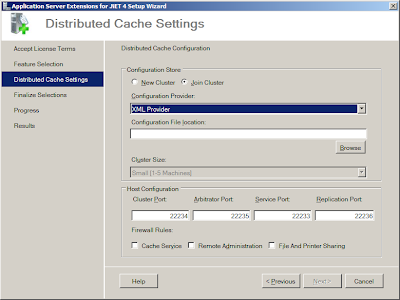
Note that the default is Join Cluster, not New Cluster, and that there's now a fourth port required (though it might have looked a bit better if the four ports had been arranged in ascending order).
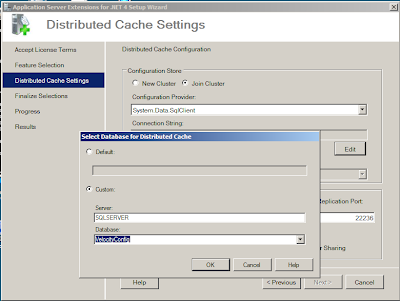
 You can still choose whether to store the caching configuration in XML files on a network share or in a SQL Server database, but there are some changes here, especially in the way you enter a SQL Server connection string.


Whereas previously you could enter by hand a connection string, you now enter the name of the server and, once the list of databases has been retrieved from the server, the name of the database that holds the configuration information. The installer then creates the connection string for you. Or you can click the Default radio button and go with the default connection string. However as this puts nothing into the connection string box, you can't see what the default is. More annoyingly, if you do click the Default option, you then can't get back into this dialog to change your mind without cancelling out of the installer and starting the install again.


Note that the connection string is using Integrated Security. And you can't change it. And you can't set the account that AppFabric runs under.
I liked the old installer where you entered your own connection string. It had a couple of quirks about what it considered to be a valid connection string, but that was OK because I'd learnt what they were. Now I feel like I've lost an element of control - I'd rather decide myself that I want Integrated Security, thank you.

And this is as far as I've got on my Velocity demo setup. Every time I finish the install, it installs the caching engine but fails to configure it. I suspect this is because although I have a network of virtual servers set up, I now need to add a domain and accounts so that the Integrated Security works.

To be continued...

Saturday, 31 October 2009

StackOverflow DevDays Cambridge Review

I attended the StackOverflow DevDays event in Cambridge yesterday, here's my review now I've had a little time to compose my thoughts...

Overall I enjoyed it lots - I saw lots of interesting bits and pieces that I want to go back and investigate properly. Here's the session-by-session breakdown:

Keynote - Joel Spolsky
Joel's theme was Simplicity vs Power and the (perceived) paradox that giving users more choice makes them less happy. It was an interesting session with some food for thought about UI design.

Yahoo Developer Tools - Christian Heilmann
I'd expected this to be about the YUI Yahoo Javascript library, however it was actually more about creating mashups using Yahoo's YQL library. Which is fine because YQL seems very cool. It takes SQL and applies it to the Internet- sites like Flickr and Yahoo Maps look like tables and can be joined, so you could, say, put up a map and overlay it with pictures taken in the appropriate places. One thing that was very impressive was Christian's use of the tools to create a tag predictor for StackOverflow, which when you type a question, looks at what you've typed and uses it to generate a set of tags for the question - I expect we'll see this implemented on the site before too long.
An audio recording of Christian's talk is here.

Seven Principles for Systems Security - Frank Stajano
This talk showed the principles by which people get scammed, whether in a shell game in the real world, or as part of a 419 fraud. Frank used video from BBC's The Real Hustle to demonstrate some of these principles. Unfortunately I didn't think there was enough linking of the principles to designing security into systems, so whilst it was an interesting session, it was only generically so. Frank's original paper can be found here
(I should mention that I don't think I'd fall for the scam involving the honeytrap - I'm a geek, if a pretty girl starts talking to me, I'm instantly suspicious!)

FogBugz - Joel Spolsky
I saw Joel last time he came to Cambridge on the FogBugz World Tour, so I'd seen much of this before. The section on Kiln was new though, and it looks interesting. It does however rely on an available Internet connection - our company lost our main Internet feed last year for about six weeks, we'd have been boned if we'd been using it then.

ASP.NET MVC - Steve Sanderson
This was a tour through developing an application using the MVC stack for ASP.NET, although ASP.NET MVC 2.0 would have been a more accurate title as Steve used the MVC 2 bits for all his code. Which was no bad thing, and it was really interesting to see him using jQuery, including jQueryUI - I did feel that this session and the session after it would have worked better the other way round, with an intro to jQuery first and then showing it 'hands-on' integrating with ASP.NET. Steve went through it all really quickly, which I think may have worked against him a bit as he was on after lunch, however for a change in the first afternoon session of a conference I managed to stay awake and interested!

jQuery - Remy Sharp
This was an overview of the core jQuery library, and although Remy was an engaging presenter, I felt it suffered a bit in trying to go through everything that jQuery covers, I thought it would have worked better in focussing on some of the common tasks that developers need to address with JavaScript and showing how using jQuery makes it easier/less code etc. One thing Remy did cover was how to create a jQuery plugin, which takes a lot less code than I'd anticipated. At the end of the session Remy started to use jQuery to build a tag cloud based on the Twitter lists he's on, which was getting really interesting until he ran out time. I thought he was going to finish coding it in the break and then show it at the start of the next session, but actually he finished and demoed it in the break, so I missed it :-(

Python  - Michael Foord
The last technical session of the day was on IronPython, which is something I've flirted with learning now and again. Michael demonstrated using it to build a spell checker which uses the algorithm that Google uses when you mistype something and it comes back with 'Did you mean...'. Which is done in 21 lines of code and uses some statistical analysis based on some source text like a dictionary, the works of Shakespeare etc. It works out every permutation of letters based on what you typed and compares it to every word in the source text to find the most likely word you meant e.g. in the source text 'the' occurred about 80 000 times, meaning if you type 'teh' it's most likely you meant 'the' and that's what it matches you up with. Michael then demonstrated that the results of the algorithm can be fed into itself enabling it to correct two errors in a word. Very neat and worth some investigation.

StackOverflow - Jeff Atwood
Jeff talked about the evolution of the StackOverflow trilogy, the team, StackExchange and the importance of having someone hate you. He talked about how it's OK to fail sometimes as that means you are pushing the boundaries. But his main thrust wasn't particularly about coding at all, it was more about the importance of writing, which he said is probably the single most important skill for developers. He backed this up with quotes from people like Douglas Crockford and Jon Skeet. As part of this, he revealed the etymology of the Strunk and White badge on the SO sites - it comes from this book, which certainly in the UK I don't think is known at all (I think this may be the closest equivalent). (Jeff said on the way to the pub that he accidentally localised the site to the USA with this badge!)
As a result of seeing Jeff's thoughts on this, I resolve to try and write better SO answers!

On to the infrastructure:
Even though I've worked in Cambridge for years, the colleges aren't somewhere I'm really familiar with. So although my satnav got me to the right road, I was then looking for the college. And I nearly drove right past it whilst looking for a sign for a car park. Which then led to my discovery that there was no car park - I ended up parking down a side street where I think I got just about the last space.
Check-in was good - I'd expected there might have been a problem as I originally registered for the London day, then switched to Cambridge. Amiando would only let me print out a London ticket, but in the event there was no issue at all with this. And it was nice to run into my old friend Graham Parker helping out.
The food was fine - having seen some of the talk on Twitter from London about what had happened there, I was a little concerned about this. I didn't try the biscuits or the fruit cake, but the main finger buffet lunch was fine, particularly the sausage rolls! I have to say, though, that having seen the tables laid out in the refectory, I'd expected we were actually having a sit-down lunch. The coffee was OK, not great by any means but it contained caffeine which, let's face it, is the important thing.
In the hall itself I found the chairs pretty comfortable, but I'd have preferred chairs with a fold-out desk that you could have put a pad on to make notes.
The big annoyance for me was the wi-fi - I was accessing it on my phone, which meant that I kept having to put the key in and then accept the terms & conditions. I would have thought an open connection would have been easier for everyone.

All in all, a solid day's learning - I'll most likely be back next year!

Tuesday, 13 October 2009

Enabling Hardware Virtualisation On A Toshiba Tecra

I've been doing a bit of playing recently with Virtual PC (and struggling, but that's a subject for a longer post). One of the options in Virtual PC is to selectively enable hardware-assisted virtualisation, however the option was greyed out on my Toshiba Tecra. Until yesterday when a chance comment by a colleague (who's also looking at VirtualPC to enable some work with SQL Server 2000 Analysis Services) let me know how to enable it...

As your laptop boots, hit [Esc] to get into the BIOS setup. You should then get a prompt at the top of the screen that reads 'Check system and press F1' - hit F1 to get into the BIOS. On the first page of the BIOS on the right-hand side is a pane for virtualisation, with a setting for enabling it - it was disabled on mine, I suspect/assume that's how they leave the factory. Highlight the setting, hit [Space] to change it, then hit [End] to save your changes and restart the machine. Let it boot into Windows, fire up Virtual PC, and you should now find that hardware-assisted virtualisation is enabled.

Edit: In my excitement to post this, there was something I forgot to add. I'd saved my running virtual machines, however when I fired them up again after enabling hardware virtualisation they would not run correctly. I needed to clear the saved state and fire them up again from scratch. Not an issue particularly, just something to be aware of.

Thursday, 24 September 2009

On the Demise of Visual Systems Journal

I was disappointed to receive the latest edition of Visual Systems Journal last week. Not because of anything in the content but because it's the last (print) issue. I've been reading VSJ for over a decade (I think - it's been going 12 years, and I'm reasonably sure I received a copy of the first issue) and it's always been quite rewarding - there's always been at least one article in it that I've got something out of, and usually several. Their book reviews have also always been insightful.
They are moving to being an entirely online publication, which means I probably won't see anything more from them - not only do I get prompted to actually read it when the physical magazine turns up on my desk, but I think things sink in deeper when I read them from a tangible page than a virtual one. And I won't get either of those benefits from looking at their website, assuming I remember to hit it at all. I see their website, ironically, still has the link offering free subscriptions.
They also run the DevWeek (where I had my first real objects epiphany) and Software Architect conferences, although I always felt they never really made the most of these assets - they had high-quality people like John Robbins, Jeff Prosise and Don Box around and never got them to produce any articles.

Tuesday, 11 August 2009

SQL Server 2008 Installation Problem

I'm blogging this in the hope that it might help someone else who's struggling with an install...

I had my laptop rebuilt last Friday, so I've spent the last two days at InstallFest :-) (I would have done most of my installing over the weekend but due to a slight oversight IT forgot to make my account an Administrator so all I could was download installers).

I started installing SQL Server 2008 Developer last night at home, but hit a problem with it. I tried again and got the same error, the exact text of which I'm repeating here in case someone Googles for it:

"Wait on the Database Engine recovery handle failed"

I put it down to a flaky connection to our VPN (a reasonable guess since our VPN has been playing up for me for a few weeks, although I think me and IT solved this between us this afternoon), so I tried again this morning in the office. Same result.

I Googled the error and found KB960781 which has the exact error message, but applies to upgrading SQL to SQL 2008 where the sa account has been renamed. As I was doing a clean install, this wasn't likely to be my culprit.

However, my fourth install attempt succeeded! What changed? I'd been configuring the SQL services to run under the Network Service account, but for this install I changed the account to the local System account. I'm guessing I could now change this back to Network Service, but I'd rather not chance it. What was the underlying issue? Frankly, I've no idea - my working theory is that there are some permissions missing from my Network Service account.

Friday, 7 August 2009

@philpursglove is in Demo Hell

Last Tuesday I took my new session on Velocity to the NxtGen User Group at Oxford, having responded to Barry's plea for a speaker. And I had a bit of a 'mare. In fact, a lot of a 'mare.

I knew I was in trouble when I fired up my laptop and the Velocity Powershell console showed an error immediately. So I tried to fix it by uninstalling and reinstalling only to discover that if you have no network connection Velocity will not install. At all. It makes no difference whether you're using a network share on the local machine to store the cluster config, or trying to store it in a SQL database on the local machine - no network, no cache.

So I'd like to thank everyone for listening and offering suggestions as to how I might have got things working faster. I've put my slides up at http://philippursglove.com/velocity , but I'm doing a bit more work on the demos, I'll put them up later this week.

Wednesday, 1 July 2009

Book Review: Code Complete

Back in April, inspired by John Robbins' blogpost about it, I promised I'd read Code Complete and review it here. I finished it last night (I confess I've read one or two other novels in between), but I can't believe it's taken me almost three months. Lest you think I'm some kind of slow reader, I will add at this point that there were also nights when I didn't read at all!
As soon as I finished it I felt like I should pick it up again and start from scratch - it's easy to see why people read it once a year. It's also easy to see why those who have read it suggest that everyone else should read it too - it's chock full (and I mean it's absolutely full at 862 pages plus bibliography and index) of tips, suggestions and methods to enable you to be a better developer.
I loved the checklist at the end of each section that you can apply to your development processes - these are also available (registration required) on the book's website though it's a slight disappointment that they aren't available as a Word or PDF download.

The message of the book is that creating high-quality software doesn't have to cost more and/or take longer than creating low-quality software, and it then lays out tools to help you do that.

It's nice to come across recommendation for things like coding styles and think 'I'm doing that already'. It's also good that the coding examples in the book are done in a variety of languages - I was fully expecting all the samples to be in C and therefore impenetrable to me, however they are done in a mix of C, Java and VB.

What didn't I like? McConnell talks in several places about programming into a language rather than programming in a language, and if I'm honest I'm not qure I entirely got what he means with this. And I found it a bit dry in places, but then I'd expect a book on software engineering written by Matthew Reilly (whose books are faster paced than anything else I've ever read) to be at least a little dry.

And I can already report some success traceable directly to Code Complete; I've tried laying out some code in a class using pseudocode that then forms the comments in the body of the code. And it is definitely a useful technique as I found it did make me think about the structure of the code before writing the code itself. So something to take forward there...

What's next for me? I may read it again in a few months - I suspect it's going to go round all our team first as I have two takers lined up already. In the interim, I have Professional ASP.NET MVC to read. I guess I should also read Writing Secure Code as I haven't read that either!