Showing posts with label AppFabric. Show all posts
Showing posts with label AppFabric. Show all posts
Thursday, 22 July 2010
AppFabric Goes South(ampton)
(Very!) Belated thanks to the good developers of the NxtGen user group in Southampton for having me down last week to give my Developers Guide to Distributed Caching with Windows Server AppFabric talk. Despite a horrible journey round the M25, I had a really good time - I felt the session went well, the technology didn't let me down, and there were some really good and interesting discussions during the session and afterwards in the pub. It was also good to put a few faces to Twitter names!

Sunday, 13 June 2010
AppFabric Goes to Ireland
Last week I gave my Distributed Caching with Windows Server Appfabric talk at EpiCenter, the Irish Software Show, at Trinity College in Dublin. My audience was a little, ahem, disappointing, particularly in the week that AppFabric was officially announced and released, since I only had one audience member, Mark Needham of Thoughtworks, who was presenting in the afternoon. I also had technical troubles with AppFabric again - clearly in a previous life I seriously pissed off the demo gods. I've now torn down my AppFabric demo infrastructure to rebuild it - this also gives me a chance to recompile my demos with the release version of AppFabric - I've been using the Release Candidate.
My slides from EpiCenter can be seen on Slideshare, and my demo code is downloadable here.
Tuesday, 8 June 2010
Windows Server AppFabric is out!
As announced at TechEd yesterday, v1 of Windows Server AppFabric was released to the web at the weekend (though like the Release Candidate, I found out the Chris Alcock's excellent Morning Brew blog). You can download it directly here, or through the Windows Platform Installer. There's an installation guide here. If you've been using the Beta 2 Refresh release, the installer will allow you to upgrade from this to the release version - there are details here.
Additional coverage:
Official announcement from the AppFabric blog
The Irish Software Show
It's the Irish Software Show this week! There are 80 sessions taking place from top speakers including Craig Murphy, Jon Skeet, Alan Dean and many others. And also, ahem, me.
I'm doing my session on Distributed Caching with Windows Server AppFabric tomorrow, Wednesday 9th June. I shall also be attempting to whip the crowd into a frenzy before Jon Skeet does his first session - yes, I'm Jon Skeet's warm-up man!
If you haven't got tickets for the show yet, it's not too late! And even better, the organisers have very kindly allocated some concession tickets to me: if you go to my page on the EpiCenter website, you can get up to €90 off the price of your ticket! And I'll see you tomorrow!
I'm doing my session on Distributed Caching with Windows Server AppFabric tomorrow, Wednesday 9th June. I shall also be attempting to whip the crowd into a frenzy before Jon Skeet does his first session - yes, I'm Jon Skeet's warm-up man!
If you haven't got tickets for the show yet, it's not too late! And even better, the organisers have very kindly allocated some concession tickets to me: if you go to my page on the EpiCenter website, you can get up to €90 off the price of your ticket! And I'll see you tomorrow!
Friday, 28 May 2010
What's New in the AppFabric Release Candidate
The Windows Server AppFabric Release Candidate was, well, released last week. Here's a quick look at changes from Beta 2.
What's New in PowerShell
Possibly the most visible change is the return of the Start Menu item for Powershell with the AppFabric module pre-loaded.

This fires up the Powershell console and runs 'Import-Module DistributedCacheAdministration' from the command-line, with the No-Exit switch to keep the console open. However it seems (at least on my Windows 7 machine) that there is something not quite right with this, as I now have to Exit from Powershell twice before the console actually closes. I've checked this on a VM running Windows Server 2008 as well as my Windows 7 laptop and it behaves the same on both platforms. Usefully, however, it also runs 'Use-CacheCluster', which if you're anything like me, saves you trying to run a cache command, then running Use-CacheCluster, then running your original command again.

I'm slightly disapppointed that the cachehelp command hasn't made a reappearance, so overall for Powershell I think I'll stick with my customised profile for importing the AppFabric commandlets.
What's New in Licensing
Err, nothing. There is no Go-Live license for the Release Candidate, although to be fair you might as well now wait another few weeks for the v1 release.
What's New in the Caching API
Again, nothing (that I can see), although since Beta 2 was the feature-complete release, it would be wrong to be making changes now.
Thursday, 20 May 2010
AppFabric Goes North!
Thanks to NEBytes for having me up to speak last night (and thanks to Andy (and Tammy :-) ) for putting me up). I ran my AppFabric distributed caching session, and for the first time nothing broke! Lots of performance problems though, caused by trying to run too many VMs on not enough memory. I think when I get home I'll review my demos: I want to run them all in one VS project to make it easier to swap between them as I'll just be able to run up one Cassini instance that'll contain all the demos. I was also thinking last night I might change the Regions/tagging demo so I get the objects from the database as required and then cache them in a lazy style. Watch this space.
I missed the first half of Jonathan Noble's session on Powershell 2.0, but I was quite impressed with what I did see. My use of Powershell can be described as 'fledgling' at best (even though it's used in managing AppFabric clusters and caches), so it was instructive to see it really put through it's paces. The remoting tools built into Powershell 2.0 look particularly impressive, it's made me think about how we manage our web servers at work and whether we should be using Powershell from our desktops instead of RDPing onto the servers and then using the IIS MMC.
I'd have liked a bit more time to look round Newcastle as it's somewhere I've never visited - maybe next time. I did get to drive past the Angel of the North, which was disappointingly somewhat less impressive than I'd anticipated. And this morning on the way back I got to see (if only on the horizon) the Middlesborough Transporter Bridge! (Thanks for the A19 tip Andy!)
Wednesday, 28 April 2010
Rebuilding CacheHelp
Ron Jacobs blogged yesterday about using the AppFabric Beta 2 Refresh and the fact that the cachehelp command seems to have disappeared. If you rely on cachehelp as much as I do, fear not! To paraphrase the start of The Six Million Dollar Man, 'we can rebuild it'...
Powershell includes a Set-Alias command, which we can use to create aliases for existing commands e.g. Set-Alias nc New-Cache. Ron helpfully provided the Powershell command we need to retrieve the AppFabric commands - Get-Command -module distributedcacheadministration - BUT you can't create an alias for a whole command-line with parameters, only for an individual command.
Fortunately we can get round this by creating a Powershell function which wrappers the commandline:
function getVelocityCommands
{
Get-Command -module distributedcacheadministration
}
Now we can use Set-Alias GetCacheHelp getVelocityCommands to create an alias which calls the function. And we're done!
Almost...
Aliases and functions are session-based - once you close down Powershell, you'll lose them. To make them persistent, you'll need to add them to your Powershell profile. There's a great tutorial here on creating Powershell profiles. Too much work? Then download this profile, which imports the AppFabric commands and creates the cachehelp alias for you.
Powershell includes a Set-Alias command, which we can use to create aliases for existing commands e.g. Set-Alias nc New-Cache. Ron helpfully provided the Powershell command we need to retrieve the AppFabric commands - Get-Command -module distributedcacheadministration - BUT you can't create an alias for a whole command-line with parameters, only for an individual command.
Fortunately we can get round this by creating a Powershell function which wrappers the commandline:
function getVelocityCommands
{
Get-Command -module distributedcacheadministration
}
Now we can use Set-Alias GetCacheHelp getVelocityCommands to create an alias which calls the function. And we're done!
Almost...
Aliases and functions are session-based - once you close down Powershell, you'll lose them. To make them persistent, you'll need to add them to your Powershell profile. There's a great tutorial here on creating Powershell profiles. Too much work? Then download this profile, which imports the AppFabric commands and creates the cachehelp alias for you.
Monday, 26 April 2010
AppFabric For .Net 4.0
So a fortnight ago .NET and VS2010 were released, and shortly after that I tried to install the AppFabric Beta 2 release on my laptop. No go - Beta 2 has a dependency on the .NET 4 Release Candidate and will not install on the .NET 4.0 RTM release. I emailed Ron Jacobs (who has made the mistake of being associated with AppFabric and being contactable) about this and asked when we'd see a release that ran on the .NET 4.0 RTM release. He answered me and then wrote up this blog (and when he talks about emails rolling in, it's mine he quotes so I'm slightly suspicious of how many he really got about this), which says that .NET developers who want to use AppFabric will have to stay on the .NET 4.0/VS2010 RC versions until an unspecified time between now and the end of June when AppFabric will RTM. I can't say that I was hugely impressed with this:

So I was quite surprised today to look at Alvin Ashcraft's Dew Drop and find:
 Which appears to be AppFabric Beta 2 rebuilt for .NET 4.0 RTM. I haven't tested it yet, but I've installed it and can confirm it installs OK onto a Windows 7 machine with .NET 4.0 RTM.
There's nothing yet about this on either Ron Jacob's blog, the Velocity blog or the .NET Endpoint blog. And I'd like Microsoft to explain their change of heart - right now, I'm interpreting it as being that AppFabric may miss it's RTM deadline of 30th June. But someone should feel free to tell me different.

So I was quite surprised today to look at Alvin Ashcraft's Dew Drop and find:

There's nothing yet about this on either Ron Jacob's blog, the Velocity blog or the .NET Endpoint blog. And I'd like Microsoft to explain their change of heart - right now, I'm interpreting it as being that AppFabric may miss it's RTM deadline of 30th June. But someone should feel free to tell me different.
Tuesday, 20 April 2010
Building A PageStatePersister With AppFabric
One of my favourite demos to do at user group sessions is to show off how you can use the SessionPageStatePersister to store page state information (Viewstate and Controlstate) on the server in Session state instead of round-tripping it to the client. But yesterday it occurred to me that you could do the same thing quite easily with AppFabric caching*.
ASP.NET has shipped with two page state persistence mechanisms since ASP.NET 2.0 was released - HiddenFieldPageStatePersister, which is the one used by default and produces those <input id="__VIEWSTATE" type="hidden" value="AnEnormousBase64EncodedTree" /> tags that we all hate so much, and SessionPageStatePersister, which instead stores the state on the web server in Session state and cuts out the roundtripping. To use the SessionPageStatePersister you need to write an Adapter class and a .browser file:
using System.Web.UI;
using System.Web.UI.Adapters;
namespace Adapter
{
public class Adapter: System.Web.UI.Adapters.PageAdapter
{
public override PageStatePersister GetStatePersister()
{
return new SessionPageStatePersister(this.Page);
}
}
<browser refID="default">
<controladapters>
<adapter controltype="System.Web.UI.Page">
adapterType="Adapter.Adapter" />
</controladapters>
</browser>
using System.Web.UI.Adapters;
namespace Adapter
{
public class Adapter: System.Web.UI.Adapters.PageAdapter
{
public override PageStatePersister GetStatePersister()
{
return new SessionPageStatePersister(this.Page);
}
}
<browser refID="default">
<controladapters>
<adapter controltype="System.Web.UI.Page">
adapterType="Adapter.Adapter" />
</controladapters>
</browser>
SessionPageStatePersister is built into the .NET Framework, so our adapter can just new it up and return it in the GetStatePersister function. If we want to build a PageStatePersister with AppFabric, however, we've got a bit more work to do. We need a class that inherits from PageStatePersister so we can implement the Save and Load methods.
using System.Web.UI;
using System.Web.UI.WebControls;
namespace AppFabricPageStatePersister
{
public class Persister : System.Web.UI.PageStatePersister
{
public Persister(Page page) : base(page)
{
}
private const string HiddenFieldId = "StateIdHiddenField";
public override void Load()
{
// Read page's incoming state Id from hidden field
string stateIdString = Page.Request.Form[HiddenFieldId];
Pair cachedState = (Pair) CacheHelper.Get(stateIdString);
ViewState = cachedState.First;
ControlState = cachedState.Second;
}
public override void Save()
{
Pair statePair;
// Build a Pair from the Page's View- and ControlState
statePair = new Pair(ViewState, ControlState);
// Generate a new ID to use as the key for storing in the cache
Guid stateId = Guid.NewGuid();
// Put the Pair in the cache
CacheHelper.Put(stateId.ToString(), statePair);
// Write the key out into the page in a hidden field so we can get it back later
Page.ClientScript.RegisterHiddenField(HiddenFieldId, stateId.ToString());
}
}
}
CacheHelper is an abstraction over AppFabric so my Persister class isn't cluttered with calls to the AppFabric objects:
using System.Web.Configuration
using Microsoft.ApplicationServer.Caching;
namespace AppFabricPageStatePersister
{
class CacheHelper
{
public static object Get(string Key)
{
DataCacheFactory factory;
DataCache cache;
string cacheName;
factory = new DataCacheFactory();
cacheName = WebConfigurationManager.AppSettings["StatePersistenceCacheName"].ToString();
cache = factory.GetCache(cacheName);
return cache.Get(Key);
}
public static void Put(string Key, object Value)
{
DataCacheFactory factory;
DataCache cache;
string cacheName;
factory = new DataCacheFactory();
cacheName = WebConfigurationManager.AppSettings["StatePersistenceCacheName"].ToString();
cache = factory.GetCache(cacheName);
cache.Put(Key, Value);
}
}
}
using Microsoft.ApplicationServer.Caching;
namespace AppFabricPageStatePersister
{
class CacheHelper
{
public static object Get(string Key)
{
DataCacheFactory factory;
DataCache cache;
string cacheName;
factory = new DataCacheFactory();
cacheName = WebConfigurationManager.AppSettings["StatePersistenceCacheName"].ToString();
cache = factory.GetCache(cacheName);
return cache.Get(Key);
}
public static void Put(string Key, object Value)
{
DataCacheFactory factory;
DataCache cache;
string cacheName;
factory = new DataCacheFactory();
cacheName = WebConfigurationManager.AppSettings["StatePersistenceCacheName"].ToString();
cache = factory.GetCache(cacheName);
cache.Put(Key, Value);
}
}
}
The adapter is straightforward - like the SessionPageStatePersister adapter, all it needs to do is return a new instance of AppFabricPageStatePersister, and the .browser file just needs to point at AppFabricPageStatePersister.Adapter.
namespace AppFabricPageStatePersister
{
public class Adapter : System.Web.UI.Adapters.PageAdapter
{
public override System.Web.UI.PageStatePersister GetStatePersister()
{
return new Persister(this.Page);
}
}
}
<browser refID="default">
<controlAdapters>
<adapter controlType="System.Web.UI.Page"
adapterType="AppFabricPageStatePersister.Adapter" />
</controlAdapters>
</browser>
Simples.
Download this demo code: C# VB
* Yes, I know you could put your Session state in AppFabric and continue to use the SessionPageStatePersister but I'm assuming you can't/don't want to use Session state.
Wednesday, 3 March 2010
What's New in AppFabric Caching Beta 2
Typical - just as I get an AppFabric Beta 1 caching cluster up and running for Edge UG this month, they release Beta 2!
This is, by all accounts, now a feature complete release for v1.0 with the RTM expected in Q3 this year. There is, however, no Go Live licence here, unlike Visual Studio. Let's take a look at AppFabric B2 and see what's changed (from a caching perspective)...
What's New in Installation
First of all, this release is aligned with the Release Candidate of .NET 4.0 and VS2010, so the dependency on the .NET Framework is moved up from the beta to the .NET 4.0 Release Candidate. Note that if you're removing the .NET 4.0 Beta in order to install AppFabric, you need to do this in Control Panel|Programs and Features, and uninstall the .NET 4.0 Framework Extended first, then the the .NET 4.0 Client Profile.
The installer seems to have had quite a bit of time spent on it for this release.
 The set of features to install is largely the same as we saw in Beta 1, with the addition of an administration piece for the Dublin workflow component.
 Post-installation, the AppFabric caching service has been renamed and no longer refers to the Velocity codename; it also now is not marked as a CTP (unlike the caching service in Appfabric Beta 1 which still showed as CTP4).
Installation and configuration have been decoupled into two separate wizards, which should make it possible to reconfigure a cluster without having to un- and re-install.The configuration wizard can be started at the end of installation, or separately from the Start menu.


What's New in Configuration
 As before when configuring the caching piece you have to decide whether to store configuration information in SQL Server or using XML and a network share. There's still no guidance on when you should use one or the other, although included in this release is a comprehensive help file.
 Selecting the SQL Server provider and clicking the Configure button opens this sub-dialog where you can build up the connection string to the configuration database. It's now explicit that if you enter the name of a database that doesn't exist and select the 'Create...' checkbox then the configurator will go and create the database for you. If you're adding a server to an existing cluster, then the 'Register...' checkbox is the one to select; if you unselect both checkboxes you lose the ability to enter any connection string information. However there seems to be a slight bug in that whether you create a new database from scratch or register a server to an existing database, when you return to the main configuration screen you can still choose whether you are creating a new cluster or joining an existing cluster.
As before, the configurator allows you set the size of the cluster to optimise the clusters' performance. The help file states that 'once you set the cluster size during configuration, you cannot change it later', however it's unclear how this fits in with the ability to re-run the configurator from the Start menu.
As I run my Velocity VM cluster with Windows Firewall disabled, I'm pleased to see that the Cache Node configuration page now detects when the firewall is disabled and accordingly disables the firewall exceptions checkboxes. This is a change to Beta 1 where the Velocity installer log would register a warning if the firewall was disabled.
What's New in Powershell
In a change from previous installs, there doesn't seem to be a Velocity Administration Powershell console installed by default; to access the Velocity Powershell commands you need to run up Powershell and then run 'import-module DistributedCacheAdministration'. Or you can add it to your Powershell profile - run 'get-help profiles' for details on doing this.
Looking at the list of Powershell commands available it seems that, unforgivably, there's still no commandlets for managing regions.The Install-Data and Install-Bits cmdlets that were in Beta 1 have disappeared.
A new feature is that it seems you can now use Powershell on any server with the Velocity cmdlets installed to manage any Velocity cluster, by using the 'Use-CacheCluster' cmdlet with a connection string to a configuration store (though the documentation talks about a connection string which implies this only works with the SQL Server provider). This cmdlet sets the context of subsequent commands e.g. Start-CacheCluster, Restart-CacheCluster. This enables you to manage multiple clusters from a server that isn't in any cluster. If you're running Use-CacheCluster on a server that is inside a cluster and has Cache Administration (from the installer) set up, you don't need to use any parameters, the current cluster is implied.
What's New in Client Configuration
The assemblies that you need to add to a project to use Velocity have been renamed, to Microsoft.ApplicationServer.Caching.Core.dll and Microsoft.ApplicationServer.Caching.Client.dll (in Windows\System32\AppFabric). The namespace has changed again, to Microsoft.ApplicationServer.Caching. And the requirement to also reference the Fabric assemblies has been removed, so there's only two references to add which makes the whole thing seem much cleaner.
The MSDN article on setting up the client environment states that there is a problem with referencing these DLLs as Visual Studio is unable to browse to Windows\System32\AppFabric, and that you need to hand-edit the project file to include these references. This seems to be incorrect, as I've just done it - I suspect that this may be due to the fact I'm running Visual Studio under an account which is an administrator on the server and thus has access to everything.
A couple of the old annoyances when writing client code are still there:
The installer seems to have had quite a bit of time spent on it for this release.


Installation and configuration have been decoupled into two separate wizards, which should make it possible to reconfigure a cluster without having to un- and re-install.The configuration wizard can be started at the end of installation, or separately from the Start menu.


What's New in Configuration


As before, the configurator allows you set the size of the cluster to optimise the clusters' performance. The help file states that 'once you set the cluster size during configuration, you cannot change it later', however it's unclear how this fits in with the ability to re-run the configurator from the Start menu.
As I run my Velocity VM cluster with Windows Firewall disabled, I'm pleased to see that the Cache Node configuration page now detects when the firewall is disabled and accordingly disables the firewall exceptions checkboxes. This is a change to Beta 1 where the Velocity installer log would register a warning if the firewall was disabled.
What's New in Powershell
In a change from previous installs, there doesn't seem to be a Velocity Administration Powershell console installed by default; to access the Velocity Powershell commands you need to run up Powershell and then run 'import-module DistributedCacheAdministration'. Or you can add it to your Powershell profile - run 'get-help profiles' for details on doing this.
Looking at the list of Powershell commands available it seems that, unforgivably, there's still no commandlets for managing regions.The Install-Data and Install-Bits cmdlets that were in Beta 1 have disappeared.
A new feature is that it seems you can now use Powershell on any server with the Velocity cmdlets installed to manage any Velocity cluster, by using the 'Use-CacheCluster' cmdlet with a connection string to a configuration store (though the documentation talks about a connection string which implies this only works with the SQL Server provider). This cmdlet sets the context of subsequent commands e.g. Start-CacheCluster, Restart-CacheCluster. This enables you to manage multiple clusters from a server that isn't in any cluster. If you're running Use-CacheCluster on a server that is inside a cluster and has Cache Administration (from the installer) set up, you don't need to use any parameters, the current cluster is implied.
What's New in Client Configuration
The assemblies that you need to add to a project to use Velocity have been renamed, to Microsoft.ApplicationServer.Caching.Core.dll and Microsoft.ApplicationServer.Caching.Client.dll (in Windows\System32\AppFabric). The namespace has changed again, to Microsoft.ApplicationServer.Caching. And the requirement to also reference the Fabric assemblies has been removed, so there's only two references to add which makes the whole thing seem much cleaner.
The MSDN article on setting up the client environment states that there is a problem with referencing these DLLs as Visual Studio is unable to browse to Windows\System32\AppFabric, and that you need to hand-edit the project file to include these references. This seems to be incorrect, as I've just done it - I suspect that this may be due to the fact I'm running Visual Studio under an account which is an administrator on the server and thus has access to everything.
A couple of the old annoyances when writing client code are still there:
- DataCacheFactory.GetCache is still not a static method, you still need to new up a DataCacheFactory.
- Some of the code around using DataCacheServerEndpoints seems to have been refactored a little bit, but it still runs on an array, not a List(Of DataCacheServerEndPoint). But you can, of course, still get round this by using a List(Of DataCacheServerEndpoint) and then calling .ToArray on it.
Wednesday, 6 January 2010
Installing AppFabric Caching Beta 1, Part 4
I'm pleased to report that I've (at last) had a measure of success with the AppFabric installer :-)
I mentioned in my last entry that I'd posted on the MSDN AppFabric Caching forum about the problems I'd been having with the installer. I also made two of my installation logs available. I'm indebted to Rahul Kaura from Microsoft, who pointed out that these were AppFabric general installation logs and steered me towards the cache-specific installation logs. These logs are found in the same place as the AppFabric logs i.e. your %TEMP% folder, are called DistributedCacheAppServerConfig(DateTime).log and I've found them invaluable in diagnosing and fixing installation problems.
So what were the problems I was having? From reading the log they seem to be largely around permissions to the Registry:
2010-01-06 11:52:52, Info DCACHE Adding access for NT AUTHORITY\NETWORK SERVICE on registry key HKEY_LOCAL_MACHINE\SOFTWARE\Microsoft\Microsoft Distributed Cache\Version
2010-01-06 11:53:16, Error DCACHE System.InvalidOperationException: This access control list is not in canonical form and therefore cannot be modified.
at System.Security.AccessControl.CommonAcl.ThrowIfNotCanonical()
at System.Security.AccessControl.CommonAcl.AddQualifiedAce(SecurityIdentifier sid, AceQualifier qualifier, Int32 accessMask, AceFlags flags, ObjectAceFlags objectFlags, Guid objectType, Guid inheritedObjectType)
at System.Security.AccessControl.DiscretionaryAcl.AddAccess(AccessControlType accessType, SecurityIdentifier sid, Int32 accessMask, InheritanceFlags inheritanceFlags, PropagationFlags propagationFlags)
at System.Security.AccessControl.CommonObjectSecurity.ModifyAccess(AccessControlModification modification, AccessRule rule, Boolean& modified)
at System.Security.AccessControl.CommonObjectSecurity.AddAccessRule(AccessRule rule)
at Microsoft.Data.Caching.InstallConfig.Program.SetResetLocalPermissions(Boolean grant)
at Microsoft.Data.Caching.InstallConfig.Program.PostConfigServiceInstallSteps()
at Microsoft.Data.Caching.InstallConfig.Program.Install()
at Microsoft.Data.Caching.InstallConfig.Program.Main(String[] args)
2010-01-06 11:53:16, Error DCACHE Unexpected Error: This access control list is not in canonical form and therefore cannot be modified.
2010-01-06 11:53:16, Info DCACHE Configuration failed, Rolling back...
which is sort of annoying as I've been running the installer under an account that is a Domain Administrator, and the Domain Admins group is part of the Administrators group on each of my cache servers. The solution was to add the account I'm using to install AppFabric to the ACL for HKEY_LOCAL_MACHINE with full permission.
The installer still reports that it fails to configure AppFabric, but this is because the log includes a Warning that the Windows Firewall is disabled, which I'm reasonably sure I can ignore.
So, I now have an AppFabric caching cluster with three servers. Onward to actually using it!
I mentioned in my last entry that I'd posted on the MSDN AppFabric Caching forum about the problems I'd been having with the installer. I also made two of my installation logs available. I'm indebted to Rahul Kaura from Microsoft, who pointed out that these were AppFabric general installation logs and steered me towards the cache-specific installation logs. These logs are found in the same place as the AppFabric logs i.e. your %TEMP% folder, are called DistributedCacheAppServerConfig(DateTime).log and I've found them invaluable in diagnosing and fixing installation problems.
So what were the problems I was having? From reading the log they seem to be largely around permissions to the Registry:
2010-01-06 11:52:52, Info DCACHE Adding access for NT AUTHORITY\NETWORK SERVICE on registry key HKEY_LOCAL_MACHINE\SOFTWARE\Microsoft\Microsoft Distributed Cache\Version
2010-01-06 11:53:16, Error DCACHE System.InvalidOperationException: This access control list is not in canonical form and therefore cannot be modified.
at System.Security.AccessControl.CommonAcl.ThrowIfNotCanonical()
at System.Security.AccessControl.CommonAcl.AddQualifiedAce(SecurityIdentifier sid, AceQualifier qualifier, Int32 accessMask, AceFlags flags, ObjectAceFlags objectFlags, Guid objectType, Guid inheritedObjectType)
at System.Security.AccessControl.DiscretionaryAcl.AddAccess(AccessControlType accessType, SecurityIdentifier sid, Int32 accessMask, InheritanceFlags inheritanceFlags, PropagationFlags propagationFlags)
at System.Security.AccessControl.CommonObjectSecurity.ModifyAccess(AccessControlModification modification, AccessRule rule, Boolean& modified)
at System.Security.AccessControl.CommonObjectSecurity.AddAccessRule(AccessRule rule)
at Microsoft.Data.Caching.InstallConfig.Program.SetResetLocalPermissions(Boolean grant)
at Microsoft.Data.Caching.InstallConfig.Program.PostConfigServiceInstallSteps()
at Microsoft.Data.Caching.InstallConfig.Program.Install()
at Microsoft.Data.Caching.InstallConfig.Program.Main(String[] args)
2010-01-06 11:53:16, Error DCACHE Unexpected Error: This access control list is not in canonical form and therefore cannot be modified.
2010-01-06 11:53:16, Info DCACHE Configuration failed, Rolling back...
which is sort of annoying as I've been running the installer under an account that is a Domain Administrator, and the Domain Admins group is part of the Administrators group on each of my cache servers. The solution was to add the account I'm using to install AppFabric to the ACL for HKEY_LOCAL_MACHINE with full permission.
The installer still reports that it fails to configure AppFabric, but this is because the log includes a Warning that the Windows Firewall is disabled, which I'm reasonably sure I can ignore.
So, I now have an AppFabric caching cluster with three servers. Onward to actually using it!
Friday, 18 December 2009
Installing AppFabric Caching Beta 1, Part 3
In Part 1 of this (unintentional) series, I talked about how the AppFabric installer works only with Integrated Security and so I needed a domain before I could install it, and in Part 2 I talked about how I then built said domain. At this point I tried once again to install AppFabric on CACHESERVER1, with all it's Integrated Security goodness. And failed. When the installer got to the configuration screen, I entered SQLSERVER in the connection string dialog, then clicked on the dropdownlist to get the list of databases on SQLSERVER. I then got a Timeout error in trying to retrieve the list of databases. No matter what I tried, I couldn't get this to work. I created a UDL file on CACHESERVER1, running Integrated Security, pointing at SQLSERVER, and confirmed that I could not only see SQLSERVER and retrieve a list of databases, but successfully connect to a database. I raised this as a question on StackOverflow and on the MSDN AppFabric Caching forum (where it looks like I'm not the only one having trouble with installations). And whilst it looks like at least some of the AppFabric team have been answering questions on the MSDN forum, I've had no answer at all to my posts.
Since then, my development laptop has been rebuilt with Windows 7, which has necessitated rebuilding my server environment from scratch with Virtual PC for Windows 7 (though there was a flirtation with VirtualBox, which I may yet go back to, although at the moment I find the process for setting up differencing disks a little too involved for my taste). With a rebuilt set of servers, I turned back to the AppFabric install, however there was one subtle difference in the server builds this time around. In trying to use the UDL files to verify that the server could contact the database ahead of the install, I encountered a problem that the SQL Server Native Client provider was not installed, so to fix this I installed the Client Connectivity bits from the SQL Server 2008 disc. When I then tried the AppFabric installer, this resolved the issue of not being able to any databases on the server. Result!
Well, not really. Although this let me proceed with the installation, the installation failed with error code 2. And no explanation for what this error means or how to fix it. And once again, the MSDN Forum has (so far) been no help. I've tried a few other things since then, including using the XML Provider for storing the configuration information instead of SQL Server. This I actually watched as it created a ClusterConfig.xml file on the network share I'd set up (thus proving that the account had enough rights on the folder), and then removed the file again. The installation failed with error code 2. Tonight I tried something else - when you select the SQL Server provider and go to enter the connection string, you can enter your own connection string, or leave it selected at Default. I tried it with Default, thinking that this would create, perhaps, a SQLExpress database that I could then transfer to my SQL Server. At the very least it would give me a working AppFabric installation that I could play with. No. Leaving the Default radio button checked does, from what I can see, nothing. There is no 'Default' connection string, in fact the installer doesn't even allow you to continue if you select this, making it the stupidest UI possible.

All of which leaves me totally stalled on working with AppFabric since I have yet to find a working configuration. It's all very tiresome.
Tuesday, 24 November 2009
Installing AppFabric Caching Beta 1, Part 2
Last week I blogged about how far I'd got with installing the AppFabric Beta 1 caching engine, in which I got stalled because the caching configuration only supports Integrated Security with SQL Server. In this part I'll cover how I've got round this problem by building a domain on my virtual servers. IT Pros may wish to skip ahead to Part 3 (or point out in the comments my no doubt numerous mistakes in how I've gone about this).I've used two reference sources in going about this: this Microsoft article, and Dave McMahons Network Admin for Developers sessions (part 1 part 2) from DDD7.
My setup is as follows:

All servers are running Windows Server 2008 on Virtual PC 2007, and all on fixed IP addresses from 192.168.10.1 upwards. Liam's already blogged about my initial troubles in getting these servers to talk to each other - they currently all have each other's names and IP addresses in their hosts file.
So, building the domain. Step 1 is installing the Active Directory Domain Services role on to SQLSERVER. This allowed me to create my velocity.local domain with SQLSERVER as the domain controller. I then created a pair of users, VelocityAdmin and VelocityUser - my plan is to use VelocityAdmin to install AppFabric onto the CACHESERVERs and then change it to use VelocityUser in normal usage, but we'll get to that in Part 3. I've also created SQL Server logons for those accounts with permissions on my VelocityConfig database.
With the domain and domain controller all set up and running Active Directory and DNS I can now add the other servers to the domain, and this is where I hit a problem. Every time I tried to add CACHESERVER1 to the domain, I got an error:

I tried a number of different things to get round this but eventually I figured it out - when I configured the network settings originally (in a non-domain world), I didn't setup a DNS server. Once I entered the IP address for SQLSERVER, I could join servers to the domain.

So at the end of all that I now have a network of servers all running under a domain. The next piece of the puzzle is to go back and try installing AppFabric Beta again, which will be Part 3 of this short series.
Friday, 20 November 2009
Installing AppFabric Caching Beta 1, Part 1
So Velocity now has a 'proper' name - AppFabric Caching, and it's finally in beta.
AppFabric Beta 1 can be downloaded from http://www.microsoft.com/downloads/details.aspx?FamilyID=0BD0B14F-D112-4F11-94BF-90B489622EDD&displaylang=en but it has a big list of dependencies and Microsoft didn't link to the download page for each dependency :-(
So, things you will need to install before installing AppFabric Beta 1 on Windows Server 2008:
Windows Server 2008 SP2 (http://www.microsoft.com/downloads/details.aspx?FamilyID=656C9D4A-55EC-4972-A0D7-B1A6FEDF51A7&displaylang=en)
.Net Framework 3.5 SP 1 (http://www.microsoft.com/downloads/details.aspx?FamilyID=AB99342F-5D1A-413D-8319-81DA479AB0D7&displaylang=en)
.Net Framework 4.0 Beta 2 (http://www.microsoft.com/downloads/details.aspx?FamilyID=9F5E8774-C8DC-4FF6-8285-03A4C387C0DB&displaylang=en)
KB970772 and KB970773 hotfixes (http://support.microsoft.com/hotfix/KBHotfix.aspx?kbnum=970772&kbln=en-us) and (http://support.microsoft.com/hotfix/KBHotfix.aspx?kbnum=970773&kbln=en-us)
IIS Web Deployment Tool (http://go.microsoft.com/?linkid=9684516)
Powershell V2 RC (https://connect.microsoft.com/windowsmanagement/Downloads/DownloadDetails.aspx?DownloadID=21268)
Go get it all and install it - it's OK, I'll wait...
Got all that? Good, let's continue...
Fire up the AppFabric installer. Once you get past the licensing, you get to this screen:

This is where you select what to install. By default the Worker and Distributed Cache Service components are selected. The Worker component is for the Workflow and Windows Communications Frameworks parts of AppFabric. Assuming you're just interested in the caching side, unselect Worker and select the others.
Then we're into the caching configuration screen. If you installed one of the Velocity CTPs this will look fairly familiar.
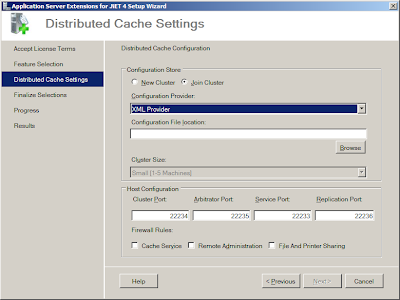 Note that the default is Join Cluster, not New Cluster, and that there's now a fourth port required (though it might have looked a bit better if the four ports had been arranged in ascending order).
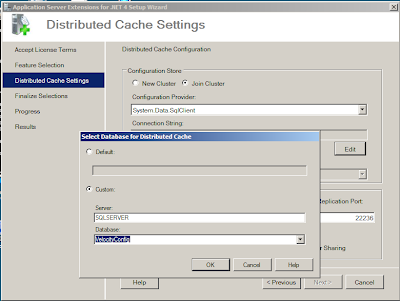

Note that the connection string is using Integrated Security. And you can't change it. And you can't set the account that AppFabric runs under.
I liked the old installer where you entered your own connection string. It had a couple of quirks about what it considered to be a valid connection string, but that was OK because I'd learnt what they were. Now I feel like I've lost an element of control - I'd rather decide myself that I want Integrated Security, thank you.
And this is as far as I've got on my Velocity demo setup. Every time I finish the install, it installs the caching engine but fails to configure it. I suspect this is because although I have a network of virtual servers set up, I now need to add a domain and accounts so that the Integrated Security works.
To be continued...

This is where you select what to install. By default the Worker and Distributed Cache Service components are selected. The Worker component is for the Workflow and Windows Communications Frameworks parts of AppFabric. Assuming you're just interested in the caching side, unselect Worker and select the others.
Then we're into the caching configuration screen. If you installed one of the Velocity CTPs this will look fairly familiar.
 Note that the default is Join Cluster, not New Cluster, and that there's now a fourth port required (though it might have looked a bit better if the four ports had been arranged in ascending order).
 You can still choose whether to store the caching configuration in XML files on a network share or in a SQL Server database, but there are some changes here, especially in the way you enter a SQL Server connection string.

Whereas previously you could enter by hand a connection string, you now enter the name of the server and, once the list of databases has been retrieved from the server, the name of the database that holds the configuration information. The installer then creates the connection string for you. Or you can click the Default radio button and go with the default connection string. However as this puts nothing into the connection string box, you can't see what the default is. More annoyingly, if you do click the Default option, you then can't get back into this dialog to change your mind without cancelling out of the installer and starting the install again.

Note that the connection string is using Integrated Security. And you can't change it. And you can't set the account that AppFabric runs under.
I liked the old installer where you entered your own connection string. It had a couple of quirks about what it considered to be a valid connection string, but that was OK because I'd learnt what they were. Now I feel like I've lost an element of control - I'd rather decide myself that I want Integrated Security, thank you.
And this is as far as I've got on my Velocity demo setup. Every time I finish the install, it installs the caching engine but fails to configure it. I suspect this is because although I have a network of virtual servers set up, I now need to add a domain and accounts so that the Integrated Security works.
To be continued...
Subscribe to:
Posts (Atom)